How to Generate a Database User Password with Special Characters?

At first glance, this doesn’t seem like a difficult task. Yet, I couldn’t find a simple and reliable solution.
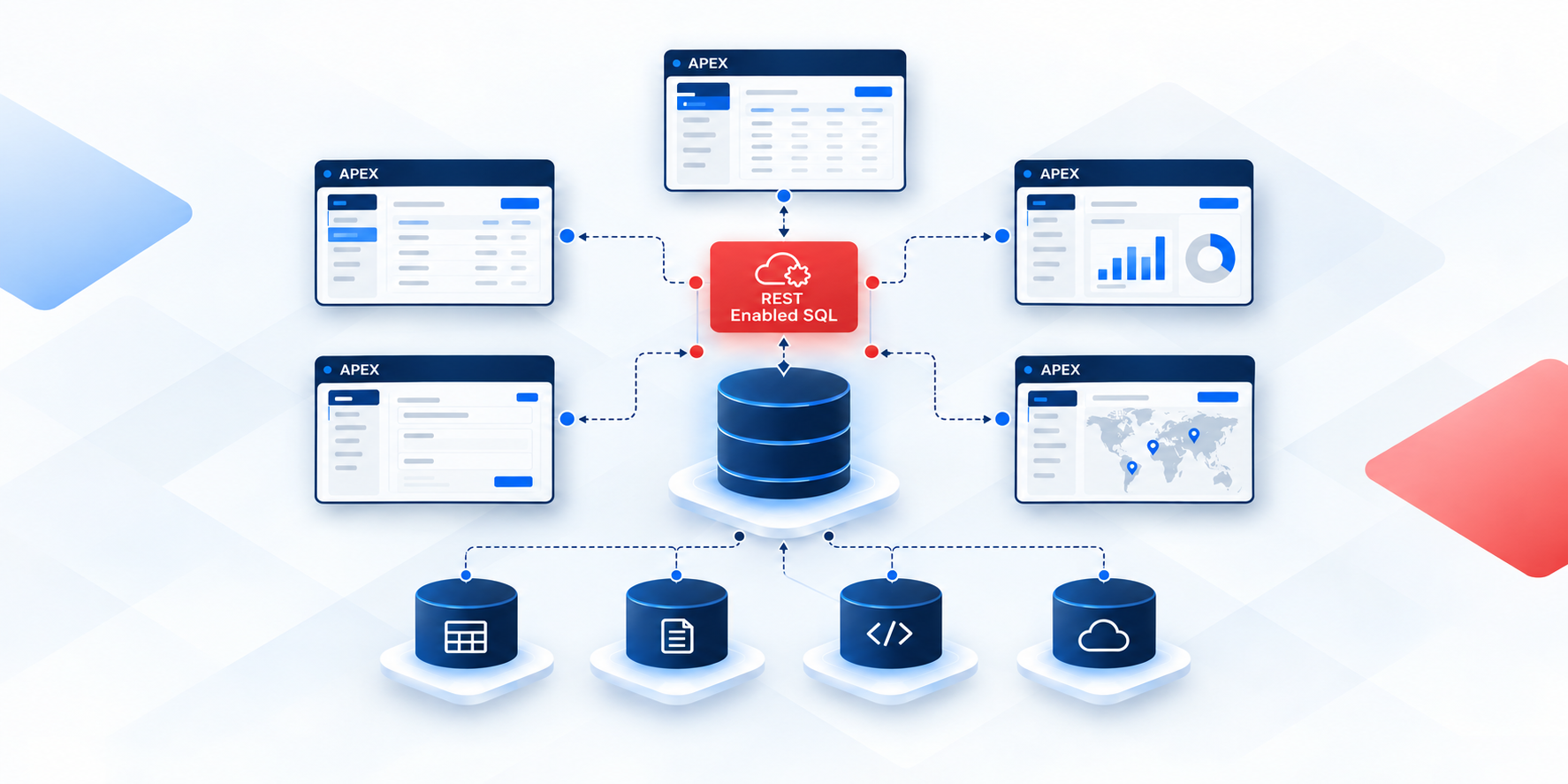
Since I am developing an APEX application to manage multiple databases, I needed a function that could generate a new password for a user and send it to a given email address.
In my case, I am working with OCI Autonomous Transaction Processing (ATP) databases, where users are assigned to the DEFAULT profile:
SELECT profile, resource_name, limit
FROM dba_profiles WHERE profile = 'DEFAULT' AND resource_type = 'PASSWORD';
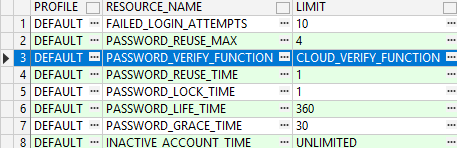
The password rules are validated by the CLOUD_VERIFY_FUNCTION:
SELECT text
FROM dba_source WHERE name = 'CLOUD_VERIFY_FUNCTION' ORDER BY line;
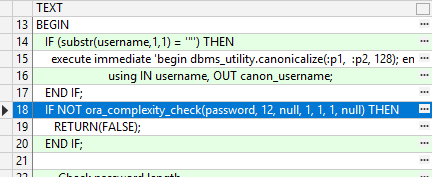
From the code, we can see that complexity is checked through the call: ORA_COMPLEXITY_CHECK(password, 12, null, 1, 1, 1, null);
This means the password must be at least 12 characters long and contain at least one lowercase letter, one uppercase letter, and one number.
But what about special characters?
The DEFAULT user profile does not enforce them, but for security reasons I wanted to ensure that generated passwords also contain at least one special character.
After checking the ORA_COMPLEXITY_CHECK function itself:
SELECT text
FROM dba_source WHERE name = 'ORA_COMPLEXITY_CHECK' ORDER BY line;
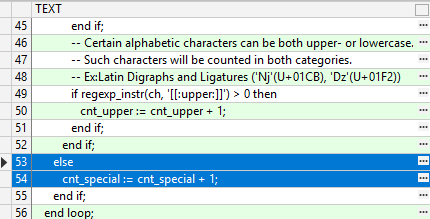
My Password Generator
I created my own password generator function using the DBMS_RANDOM package:
create function f_pwd_gen(p_length number default 20) return varchar2 as
    a number:=0;
    k number;
    i number;
    r varchar2(100); -- result
    v_check varchar2(100);
begin
    loop
      -- The password must begin with a character!
      a:=a+1; -- iteration counter
      r:=upper(dbms_random.string('u',1));
      v_check:='';

      for k in 2..least(p_length,100) loop -- max 100 chars
          i:=round(dbms_random.value(0,9));
          if i between 0 and 3 then -- lower
            r:=r || lower(dbms_random.string('u',1));
            v_check:=v_check || 'L';
          elsif i between 4 and 6 then -- upper
            r:=r || upper(dbms_random.string('u',1));
            v_check:=v_check || 'U';
          elsif i between 7 and 8 then -- number
            r:=r || lower(round(dbms_random.value(0,9)));
            v_check:=v_check || 'N';
          else -- special
            r:=r || SUBSTR('#$_', dbms_random.value(1, 3), 1);
            v_check:=v_check || 'S';
          end if;
      end loop;

      -- Replace potentially misleading characters
      r:=replace(r,'o','f');
      r:=replace(r,'0','3');
      r:=replace(r,'O','G');
      r:=replace(r,'l','t');

      exit when a>100
        or (instr(v_check,'L')>0 and instr(v_check,'U')>0
        and instr(v_check,'N')>0 and instr(v_check,'S')>0 );
   end loop;

   return r;
end;
At first, I tried including as many symbols as possible in the “special character” line. However, when setting the new password, I constantly received error messages.
The Real Issue
Passwords are usually set with a command like:
ALTER USER SCOTT IDENTIFIED BY fsd32fasSD_FS;
If you don’t wrap the password in quotes, the SQL parser interprets many special characters incorrectly. That’s why it may look like only #, $, or _ are allowed.
✅ The fix is simple: enclose the password in double quotes. (Of course, I only realized this much later.)
ALTER USER SCOTT IDENTIFIED BY "N3w!Pass@2025";
When quoted, Oracle accepts almost any character (except the double quote " itself and the null character).
⚠️ Be aware that some shells and tools (SQL*Plus, terminals, scripts) interpret certain characters (!, &, \) before they reach the database. In those cases, escape them at the client level or use EXECUTE IMMEDIATE in PL/SQL to set the password.
Conclusion & Best Practices
Even though Oracle’s ORA_COMPLEXITY_CHECK function doesn’t require special characters by default, you can and should include them for stronger security. The key is to quote your password in the ALTER USER statement so all special characters are accepted.
If you’re building workflows in Oracle APEX (or any automation around database password resets), keep in mind:
Always quote the password in
ALTER USER.Test which characters your client environment accepts without extra escaping.
Replace ambiguous characters (
O,0,l) to avoid confusion.Consider sending passwords securely.
Require users to change their generated password upon first login.
👉 By quoting the password properly, you can safely generate and use strong passwords containing a full range of special characters.