Planning Oracle APEX Applications Before You Build
Based on a 2023 talk
This article is based on a presentation I gave at the Oracle APEX Budapest Meetup in October 2023.
The examples used the familiar Oracle HR schema, but the underlying planning principles apply to much larger business applications as well.
Oracle APEX makes it very easy to start building.
That is one of its greatest strengths.
But it also creates a temptation:
to start creating pages before thinking through the application structure.
For small applications, this may work.
For larger business systems, it usually creates problems later:
- inconsistent navigation
- duplicated pages
- unclear authorization
- too many Dynamic Actions
- unnecessary modal dialogs
- an application that becomes harder to understand as it grows
In my experience, a little planning before opening Page Designer saves a lot of restructuring later.
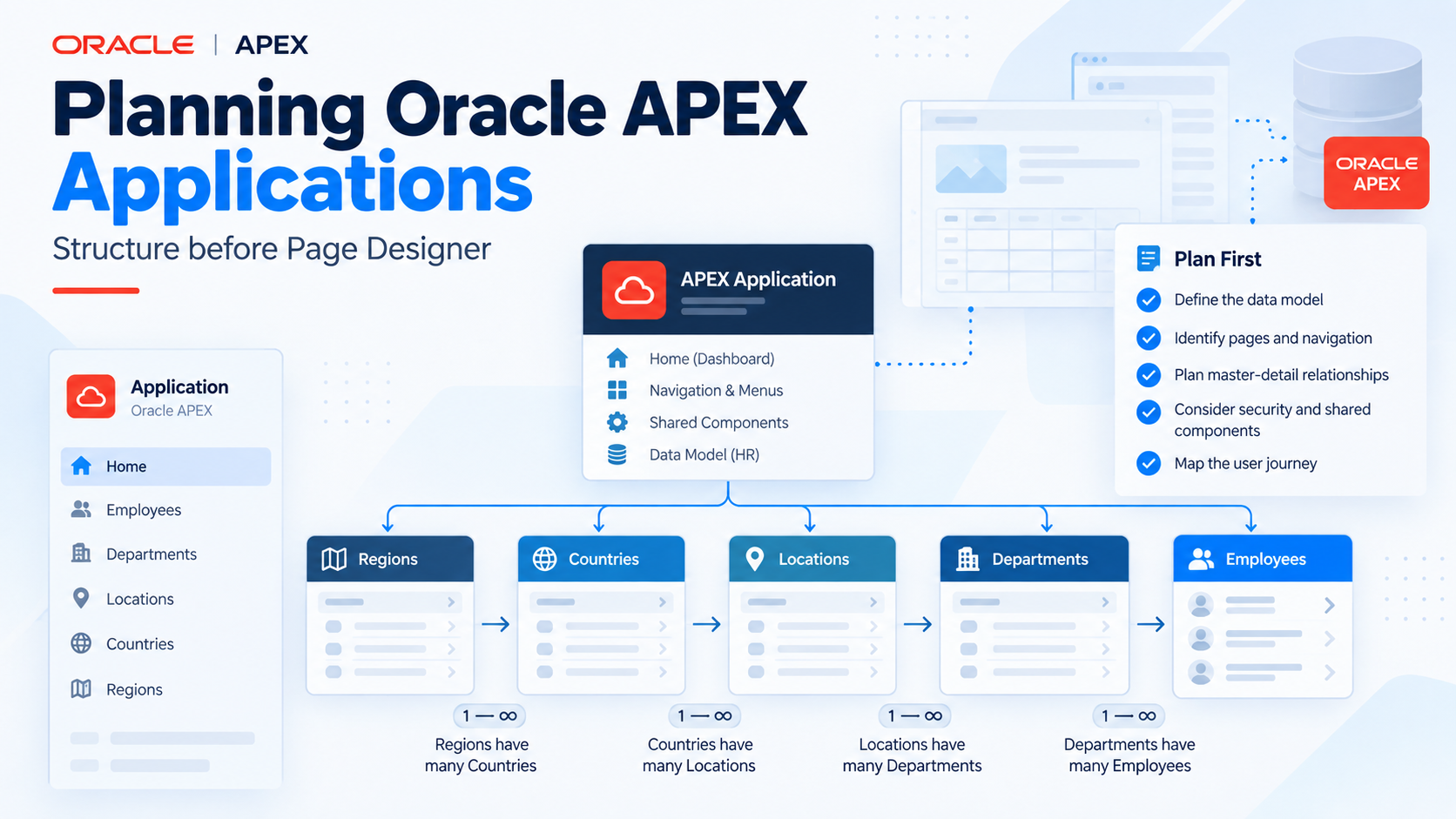
Start with the data model
For the original presentation, I used the Oracle HR schema.
It contains familiar entities such as:
- Employees
- Departments
- Locations
- Countries
- Regions
This is a simple model, but it is enough to illustrate an important point:
application structure should reflect both the relationships in the data and the way users work with that data.
The first question is therefore not:
Which APEX page type should I create?
It is:
How does the user move through the business information?
The simplest navigation model
A first version of the application might look like this:
Home
├── Employees
│   └── Employee Data
├── Departments
│   └── Department Data
├── Locations
│   └── Location Data
├── Countries
│   └── Country Data
└── Regions
    └── Region Data
This is straightforward.
Every entity gets a list page and a detail page.
For a small application, this can already work well.
But business applications rarely remain this simple.
Master-detail relationships change navigation
Consider Departments and Employees.
A department is not only an independent record.
It also has employees.
Instead of forcing users to return to the Employees menu and search again, it is much more natural to allow them to navigate directly:
Department
    ↓
Department Data
    ↓
Department Employees
    ↓
Employee Data
The application begins to reflect the actual relationship between the data.
The same idea can be extended further:
Region
    ↓
Countries
    ↓
Locations
    ↓
Departments
    ↓
Employees
This is much closer to how users often think about business data.
Think in user journeys, not only pages
A common mistake is to design an APEX application as a collection of isolated pages.
The better question is:
What path will the user follow?
For example:
Regions
→ Region
→ Countries in Region
→ Country
→ Locations in Country
→ Location
→ Departments at Location
→ Department
→ Employees in Department
→ Employee
Once this flow is clear, several design decisions become easier:
- which pages should exist
- which pages can be reused
- where links should appear
- what should be shown as related information
- which actions should return the user to the previous context
The application becomes a connected system rather than a collection of separate screens.
Reuse pages where possible
One of the things I explicitly warned against in the original presentation was:
duplicated pages.
It is tempting to create a separate Employee page for every context:
- Employee from the Employees menu
- Employee from a Department
- Employee from Search
- Employee from another report
Usually, this is unnecessary.
A better design is to reuse the same page and pass the appropriate record ID and context.
This reduces:
- duplicated logic
- duplicated validations
- maintenance effort
- inconsistent behavior
The more business logic a page contains, the more important reuse becomes.
Master-detail is a design concept
When I say master-detail, I am not necessarily talking about one specific APEX page type.
I am talking about the relationship between business objects and the way users navigate between them.
There are several ways to represent these relationships in APEX:
- master-detail pages
- related reports
- tabs
- regions
- links
- cards
- Interactive Reports
- modal dialogs
The important decision comes before the component choice.
First define:
what information belongs together and how the user should move between it.
Then choose the APEX components that best support that flow.
Plan authorization early
Authorization should not be something we add at the very end of the project.
Even a simple application can quickly develop several permission levels.
For example:
Login
├── Data View
├── Data Edit
├── Parameter View
└── Parameter Edit
These permissions affect much more than buttons.
They may determine:
- which pages are visible
- which menu entries appear
- which regions are rendered
- which actions are available
- which data can be modified
If authorization is considered only after the application is already built, the existing structure may make permission management unnecessarily difficult.
Navigation and authorization belong together
A page may technically exist while being unavailable to a particular user.
That is often correct.
But the navigation should reflect the same authorization model.
For example, if a user cannot maintain parameters, there should usually be no visible navigation path leading to parameter maintenance.
This sounds obvious, but in larger applications inconsistent menu and page authorization can become confusing very quickly.
Planning both together avoids this.
Standardization matters
Another key point in the original talk was:
standardize as much as possible.
Oracle APEX already gives us an important advantage through Universal Theme.
Use that advantage.
Standardization can include:
- page layouts
- report behavior
- button placement
- dialog behavior
- navigation patterns
- naming conventions
- templates
- validation patterns
- authorization schemes
Users should not have to learn the same application again on every page.
Developers should not have to rediscover how every page was built.
Universal Theme is more than visual design
Universal Theme is often treated mainly as a visual layer.
I think it is more useful to view it as a shared design vocabulary.
When standard components already solve a problem, creating a custom implementation should require a reason.
Custom JavaScript and CSS are sometimes necessary.
But every custom solution also creates something developers need to understand, test and maintain later.
Consistency is especially valuable in large business applications.
Five things I try to avoid
The original presentation ended with a short DON'T DO list.
These were the five points.
1. A modal dialog opening another modal dialog
A modal can be very useful.
A chain of modal dialogs usually is not.
Users can quickly lose track of:
- where they are
- what they are editing
- what happens when they close a dialog
- which page owns the current state
If a workflow becomes that deep, it may deserve a normal page.
2. Duplicate pages
Avoid creating nearly identical pages for slightly different navigation paths.
Reuse the same page when the business function is the same.
Otherwise every later change may have to be repeated in several places.
3. Excessive Dynamic Actions
Dynamic Actions are powerful.
That does not mean every piece of application behavior should become a Dynamic Action.
If a page contains many interacting client-side actions, understanding its behavior becomes increasingly difficult.
Use Dynamic Actions where they make the interaction clearer, but keep the overall application flow understandable.
4. Missing navigation
A technically working page is not automatically a usable application.
Users need to understand:
- where they are
- how they arrived there
- where they can go next
- how they can return
Navigation is part of application design, not decoration.
5. Missing grouping
As applications grow, flat menus and long page lists become difficult to understand.
Group related functions.
This can be done through:
- navigation hierarchy
- menus
- cards
- page groups
- functional modules
- consistent naming
Structure becomes increasingly valuable as the number of pages grows.
Plan before Page Designer
The main message of my 2023 presentation was simple:
do not let the speed of Oracle APEX development replace application design.
APEX allows us to create pages extremely quickly.
That makes planning more important, not less.
Before building an application, I try to answer questions such as:
- What are the main business objects?
- How are they related?
- What are the main user journeys?
- Which pages can be reused?
- What authorization levels exist?
- How should navigation reflect those permissions?
- Which UI patterns should be standardized?
Once these questions are reasonably clear, Page Designer becomes much easier to use effectively.
A simple planning model
For many applications, the planning process can be summarized like this:
Data model
    ↓
Business objects
    ↓
Relationships
    ↓
User journeys
    ↓
Pages
    ↓
Navigation
    ↓
Authorization
    ↓
Standardized UI
The exact implementation may change.
The sequence of thinking is what matters.
Build quickly, but design deliberately
Oracle APEX gives developers an unusually fast way to turn database structures into working business applications.
That speed is a major advantage.
But speed should not mean that architecture, navigation and usability are decided accidentally while pages are being created.
A few minutes spent drawing relationships and user journeys before development can prevent much more expensive restructuring later.
That is one of the principles I have continued to use when building larger Oracle APEX applications:
build quickly, but design deliberately.