Connecting Oracle APEX Applications with REST Enabled SQL
Based on a 2024 conference talk
This article is based on my presentation “Linking All My APEX Together with REST Enabled SQL”, delivered at APEX Alpe Adria on April 12, 2024.
It reflects the architecture, problems and lessons I presented at the time, adapted into article form for publication on davidpataki.com in 2026.
Running a software development company means constantly trying to answer questions that are surprisingly difficult to answer well.
What are my developers working on?
What should we be working on?
What have we already completed?
What do our clients want from us?
Are we within budget?
Is the project profitable?
And perhaps most importantly:
Do I actually have enough information to answer these questions in time?
In 2024, I presented at APEX Alpe Adria how we approached this problem at Enrol Consulting using Oracle APEX and REST Enabled SQL.
The technical solution was important.
But the real problem was information.
The information problem
At the time, there were several things I found difficult to follow:
what my employees were doing
what we should do next
what we had already done
what our clients wanted us to do
whether we were within budget
whether a project was profitable
whether individual employees were profitable
whether we had deviated from the project plan
which errors still had to be handled
The information existed.
The problem was that it often arrived:
too late
in too little detail
too generally
too fragmented
This is a common problem in software projects.
The customer has information.
The developer has information.
The project manager has information.
The application has information.
The timesheet has information.
But these pieces do not necessarily form one coherent picture.
A typical workflow
A simplified software development workflow might look like this:
Customer
   ↓
Idea / need / error
   ↓
Task management
   ↓
Developer
   ↓
Doing / fixing
   ↓
Timesheet
   ↓
Testing
The problem becomes more complicated when the customer's business application and the development company's internal task-management system are separate.
A requirement may originate inside the client's application, while the corresponding task is managed somewhere else.
The developer then performs the work in the client's environment and later records it in yet another place.
Every additional system increases the chance that information will be:
duplicated
delayed
simplified
forgotten
disconnected from its original context
What did we actually need?
We identified three important goals.
Manage tasks where they belong
A problem occurring on a particular page of an application should be easy to create and follow from that context.
The user should not have to leave the business application, open another task-management product and reconstruct where the problem occurred.
Manage all tasks in one place
From our side, however, we needed a consolidated view.
We work with multiple applications and multiple clients.
Project managers and developers cannot efficiently manage work if every client's requests remain isolated inside separate systems.
Make administration as easy as possible
This was especially important for developers.
If recording information creates too much additional work, people naturally postpone it.
And once information is entered days later, it becomes less accurate.
So the goal was not to create more administration.
The goal was to capture useful information as part of the work itself.
Two systems, one workflow
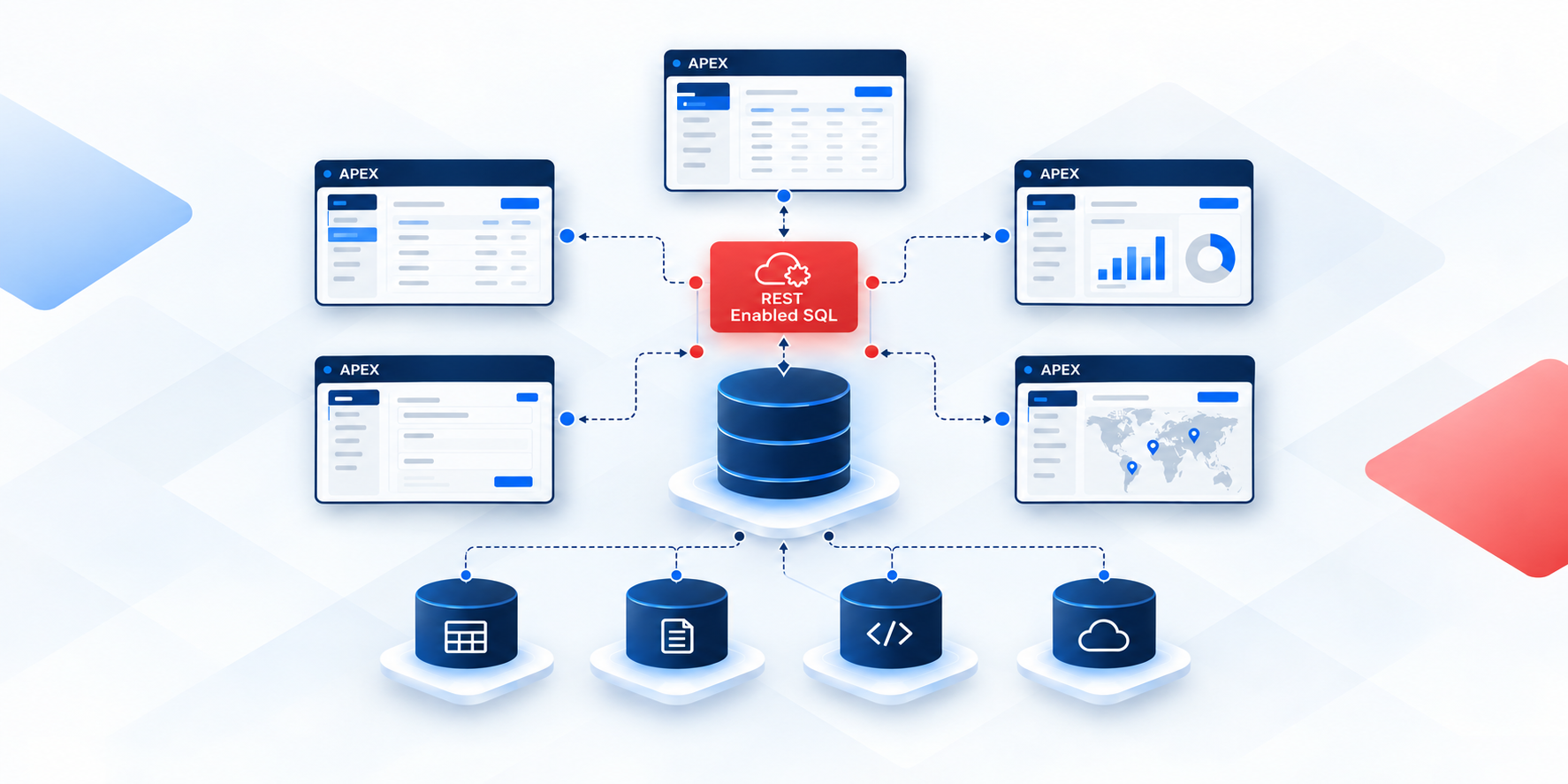
The basic architecture involved two different environments:
Client's ERP / APEX application
             ↕
      REST Enabled SQL
             ↕
        Enrol's ERP
The client continued using their own application.
We continued using our own internal ERP.
REST Enabled SQL connected the two.
This allowed the client-facing functionality to stay where it made sense while giving us a centralized view of the work.
The customer did not need to become a user of our internal project-management system.
And our developers did not need to manually recreate every customer request inside another application.
Why REST Enabled SQL?
Oracle APEX applications are frequently built around Oracle Database.
When both sides of an integration belong to the Oracle ecosystem, REST Enabled SQL provides an interesting option.
Instead of building a separate REST endpoint for every individual operation, an APEX application can work with SQL and PL/SQL executed against a REST-enabled remote Oracle schema.
For our use case, this was attractive because the data model and business processes were still evolving.
But REST Enabled SQL was not something we simply enabled and forgot about.
The original presentation deliberately included several questions we had to consider:
limitations of REST Enabled SQL
security
the right architecture
what happens when the connection is unavailable
user synchronization
maintainability
Those architectural questions were just as important as establishing the connection itself.
The connection schema
One of the important architectural decisions was the use of a separate connection schema.
Instead of exposing the internal ERP schema directly, the integration could operate through a dedicated database layer.
Conceptually:
Client APEX application
        ↓
REST Enabled SQL
        ↓
Connection schema
        ↓
Internal application data
This provided a natural place to control what the remote application could access.
The connection layer could expose only the database objects and operations required by the integration.
That separation matters.
When connecting systems, the easiest technical solution is not always the architecture you want to maintain for years.
Client-side configuration
The client application also needed its own REST Enabled SQL configuration.
Once the remote data source had been configured, APEX components could use information from the connected environment.
Some of the practical examples in the presentation included:
Lists of Values
lists of users
lists of statuses
application maintenance
status maintenance
user maintenance
This meant that information did not necessarily have to be duplicated into every client database.
The application could retrieve the relevant values through the connection.
Think about maintenance from the beginning
Connecting two systems is only the first step.
Sooner or later, something changes.
A new system is added.
A status changes.
A user joins or leaves.
Permissions change.
That is why the presentation included dedicated maintenance functions for:
Systems
Statuses
Users
These may look like small administrative details.
They are not.
An integration that works only while its original configuration remains unchanged becomes expensive very quickly.
The maintenance model is part of the architecture.
User synchronization is a real problem
Users are particularly interesting.
The same person may exist in both environments, but the two systems do not necessarily identify them in the same way.
A developer may exist in our ERP.
A customer user exists in the client's system.
Permissions and identities may change independently.
The original project therefore had to consider user synchronization as a separate architectural issue.
This is a good example of why integration is rarely just about transporting data.
You also need to decide what the data means on both sides.
What if there is no connection?
Another question we considered was simple:
What happens when the remote system cannot be reached?
Distributed systems fail.
Networks fail.
Services become temporarily unavailable.
Authentication can fail.
An architecture that assumes a permanent connection without considering failure conditions will eventually create problems.
This is especially important when the remote functionality is embedded inside the normal user workflow.
The technical integration should therefore never be considered separately from availability and error handling.
The resulting workflow
The final solution connected our internal ERP and the client's ERP through REST Enabled SQL.
The customer could work with development-related information from their own application.
For example, they could:
add new client needs
define priorities
follow tasks
ask additional questions
answer questions
report errors
At the same time, our internal system could use that information for:
time management
project planning
an overview of all projects
The fundamental idea was:
Customer works here
        ↓
Client's application
        ↓
REST Enabled SQL
        ↓
Enrol's ERP
        ↓
Project management and development
The customer stays in the customer's application.
Our team stays in our system.
The information connects the two.
Everything happens in context
One of the most important design goals was that the customer should be able to work with the task where the task actually belongs.
Imagine that a user is on a particular page of an APEX application and finds a problem.
Instead of opening a completely separate task-management system, the application can already know:
which system the user is in
which page they are on
which business context is involved
The request can therefore be connected to that context from the beginning.
This reduces one of the most common sources of wasted time in support and development:
“Which screen are you talking about?”
Task list
From the client's point of view, tasks can still appear as a normal part of their application.
They can see the tasks relevant to their system.
They do not need access to all projects or all customers.
On our side, those same tasks can become part of a consolidated task-management environment.
This gives the two sides different views of the same work.
Editing a task
A task is not just a text description.
During its lifecycle it accumulates information.
For example:
description
priority
questions
answers
assignments
status changes
timing information
Connecting the task to the application gives all of this information context.
How many issues are related to this page?
One of the ideas demonstrated in the original presentation was showing the number of issues related to the current system or page.
This is a small feature, but it illustrates the advantage of integration very well.
Instead of thinking of task management as a completely separate application, task information becomes another dimension of the business application.
A user can see that there are open issues related to the area they are currently using.
That is very different from maintaining a completely disconnected ticket list.
A task is also a history
We did not only need the current status of a task.
The sequence of status changes was valuable too.
Conceptually:
Task
 ├── Status 1
 ├── Status 2
 ├── Status 3
 └── Current status
A task's status history tells a story.
It can show when:
work started
additional information was requested
the customer responded
development finished
testing began
a problem was reopened
the task was completed
That history later becomes useful for reporting.
Tasks became part of a larger model
In our internal system, the task did not remain an isolated object.
It became connected to other business information.
The presentation showed relationships between areas such as:
Client
  ↓
System
  ↓
Order
  ↓
Task
  ↓
Task Status

Task
  ↓
Timesheet
  ↓
Developer

Developer
  ↓
Employee Performance

Orders and Tasks
  ↓
Financial Planning

Developer
  ↓
Presence Planning

Client
  ↓
Transaction
  ↓
Invoice
This is where the solution became much more valuable.
Once the task is connected to the rest of the company's operational data, it becomes possible to analyze much more than whether the task is open or closed.
From task management to time management
The next step was connecting tasks with timesheets.
Traditional timesheets often have an inherent problem.
At the end of the day—or sometimes several days later—the developer has to remember:
What exactly did I work on?
But our system already had activity information.
It knew which tasks the developer had interacted with.
That gave us the idea of showing:
Tasks I have touched today
Instead of starting from an empty timesheet, the developer could start from actual task activity.
A different approach to filling the timesheet
The process became approximately:
Tasks I touched today
        ↓
Assign hours
        ↓
Assign start time / break
        ↓
Generate the daily time settlement
This is a fundamentally different experience from entering timesheet rows from memory.
The administrative process starts with data that already exists.
The developer mainly needs to add the time dimension.
Daily time settlement
Once the tasks and hours are connected, the system can create a daily time settlement.
Now every recorded period of work has context.
It is not just:
8 hours - development
It can be associated with:
Developer
    ↓
Task
    ↓
System
    ↓
Project / Order
    ↓
Client
That produces much more useful management information without requiring the developer to enter all of that information manually.
Better data changes reporting
The final part of my 2024 presentation focused heavily on the results.
Once tasks, statuses, systems, projects, developers and timesheets were connected, we could build reports that previously would have been difficult or unreliable.
Project phases
Because task statuses were recorded over time, we could analyze project phases.
Instead of having only a current snapshot, we could see how work moved through the process.
This helps answer questions such as:
Where is work accumulating?
Where do tasks spend the most time?
Has testing become a bottleneck?
Are many tasks waiting for additional information?
Activity based on statuses
Status changes also became a useful measure of activity.
They do not tell the complete story of developer productivity.
But they provide another view of what is happening in the system.
The important thing is that this information is generated naturally by the workflow.
No separate reporting process is required just to create the data.
What are we working on now?
This was one of the questions that originally motivated the project.
With the integrated data model, we could begin answering it from actual system activity.
The answer no longer depended only on somebody manually preparing a project-status report.
Systems, projects and orders
Tasks could also be analyzed in the context of projects and orders.
That allowed us to compare planned work with actual activity.
For a software company, that connection is particularly important.
A project can appear busy while consuming much more effort than expected.
Without connecting task activity to commercial and planning information, that problem may only become visible much later.
Project timesheets
Because timesheet entries were connected to tasks and projects, project-level time analysis became much more accurate.
We could move from:
How many hours did this developer report?
toward questions like:
How much effort did this particular project, system or group of tasks consume?
That is much more useful for project management.
Task statuses over time
The presentation included reports analyzing task statuses over selected periods.
Historical status information can reveal patterns that a current task list cannot.
For example, a current task may simply show:
Done
But the history can reveal that it spent a long time waiting in another phase.
That information can help explain delays and improve future planning.
Tasks assigned to developers
Because tasks were connected to developers, workload distribution could also be analyzed.
Again, the purpose was not simply to count tasks.
Ten trivial tasks and one major task are not equivalent.
But task assignments combined with statuses, estimates and timesheets provide useful context.
Closed and open tasks
The system could analyze task statuses both including and excluding closed tasks.
This matters because different questions require different views.
For operational work, we may care mainly about active tasks.
For retrospective project analysis, closed tasks are essential.
A good reporting model needs both perspectives.
Overrun tasks
Once estimated effort and actual timesheet information exist in the same data model, we can identify tasks whose actual effort exceeds expectations.
Conceptually:
Estimated effort
       vs.
Actual recorded effort
This is one of the most useful connections between task management and financial management.
Without the connection, overruns may become visible only at project level.
With it, the problematic task can be identified much earlier.
Overdue tasks
The same applies to deadlines.
Open and closed tasks can be evaluated against expected completion dates.
That provides a practical basis for investigating:
delays
bottlenecks
underestimated work
blocked activities
System profitability
This was one of the questions at the very beginning of the presentation:
Is the project profitable?
By connecting clients, systems, orders, tasks, developers and timesheets, we created a much stronger foundation for answering that question.
The integration did not magically calculate profitability.
It did something more fundamental:
it created the data relationships required to understand it.
Weekly dashboard
The same data could finally be summarized in management dashboards.
The path from the original problem to the dashboard was not:
Build a better dashboard
It was:
Capture better information
        ↓
Connect it to the right business objects
        ↓
Make the workflow easy enough to use
        ↓
Then build the dashboard
That distinction is important.
A beautiful dashboard cannot fix incomplete or fragmented source data.
What I learned from the project
Looking back at the 2024 presentation, REST Enabled SQL was an important part of the solution.
But it was not the main lesson.
The main lesson was about information flow.
We wanted to manage tasks where they naturally belonged.
We wanted to see all development work in one place.
And we wanted the administrative burden to be as small as possible.
REST Enabled SQL helped us connect those goals technically.
The database was the integration layer
There is also a broader architectural lesson here.
Both sides were based on Oracle technologies.
That meant the database itself could play a significant role in the integration.
Rather than moving all data into a new central application or forcing every customer to use the same task-management interface, we could connect applications while allowing each system to retain its role.
For this particular use case, that was a very powerful model.
Would I use REST Enabled SQL everywhere?
No.
The presentation itself already considered:
its limitations
security
architecture
availability
user synchronization
maintenance
Those questions still matter.
For public integrations, external consumers or strongly versioned service contracts, a dedicated REST API may be a more appropriate abstraction.
But when connecting Oracle-based environments that we understand and control, REST Enabled SQL can be a remarkably productive tool.
The right question is not:
Is REST Enabled SQL better than REST APIs?
The better question is:
Which integration model best fits the systems, data ownership, security requirements and development process we actually have?
Looking back from 2026
I gave this presentation on April 12, 2024.
Two years later, I find the underlying idea even more relevant than the specific implementation.
Modern development gives us more tools, more APIs, more automation and increasingly more AI.
But the central architectural questions remain surprisingly stable:
Where should the information live?
Where should the user work?
Who owns the data?
How can we avoid entering the same information twice?
How do we capture useful data without creating unnecessary administration?
How do we turn operational activity into information that helps us make better decisions?
In our case, connecting multiple Oracle APEX applications with REST Enabled SQL was one practical answer.
The result was not simply an integration between databases.
It was a connection between:
customer needs, tasks, developer activity, time, project planning and business results.